CrowPanel Advance HMI| ESP32-S3 AI-Powered IPS Touch Screen
Get Started with Arduino IDE
Please click the card below to learn how to install Arduino IDE, and install ESP32 board in the Arduino IDE.
Requirements for the required environment:
Please use esp32 by Espressif Systems version 3.0.2.
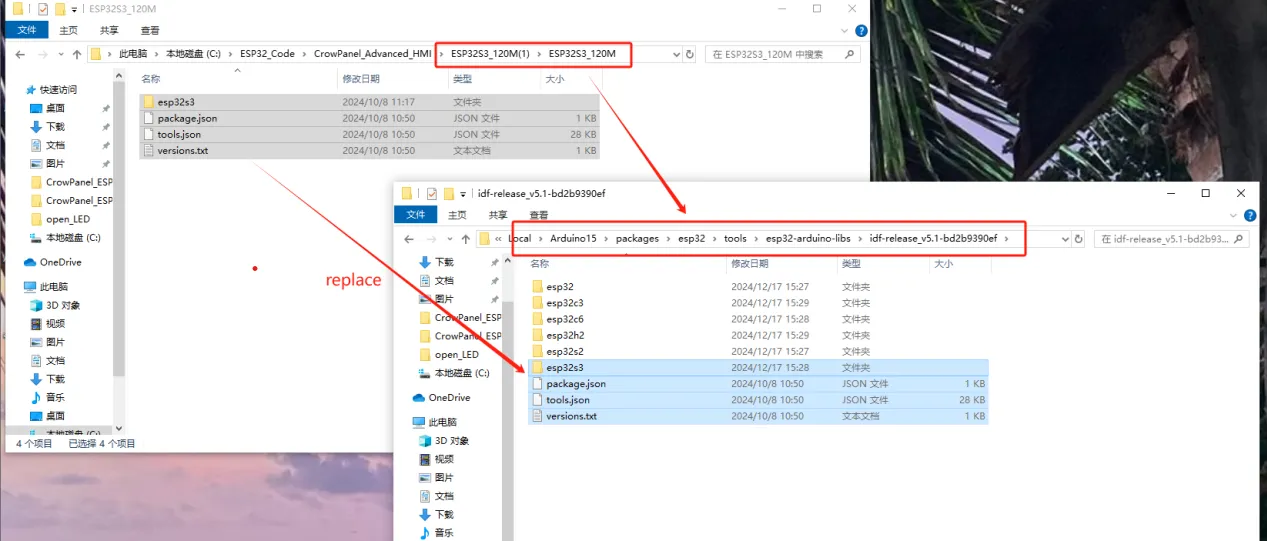
After installing the ESP32 board package, you will need to replace the corresponding files in the ESP32 framework directory. Open the ESP32S3_120M folder that we provided and copy all files from that folder.
Click the link below to download the ESP32S3_120M file:
Then navigate to the following directory:
C:\Users\your—username\AppData\Local\Arduino15\packages\esp32\tools\esp32-arduino-libs\idf-release_v5.1-bd2b9390ef
Paste the copied files into this directory and replace the existing files when prompted. Once the replacement is complete, the environment will be properly configured and ready for use.
Note: "ESP32S3_120M" is a recompiled version of the official ESP32 framework with high-speed PSRAM communication mode enabled. The increased display refresh rate is only one of the optimizations it provides. Without this modification, the PSRAM frequency is limited to 80 MHz; after replacing the files, it can operate at up to 120 MHz, resulting in improved overall performance and smoother graphics rendering.
Replacing these files can significantly reduce or eliminate screen flickering and display jitter issues that may occur during program execution, resulting in a smoother and more stable display performance
Library Version Requirements:
-
ESP32-audioI2S-master : 2.0.0
-
LovyanGFX : 1.1.16
- RF24 : 1.6.1
- RadioLib : 7.1.0
- TAMC_GT911 : 1.0.2
- lvgl : 8.3.11
The libs are provided directly by our wiki, just use the libs provided by the wiki.
Please download the library files from the link below. This library package is universally compatible with all supported display sizes, and no additional libraries are required for different versions.
Code link
- CrowPanel-Advance-2.4-HMI-ESP32-S3-AI-Powered-IPS-Touch-Screen code link
- CrowPanel-Advance-2.8-HMI-ESP32-S3-AI-Powered-IPS-Touch-Screen code link
- CrowPanel-Advance-3.5-HMI-ESP32-S3-AI-Powered-IPS-Touch-Screen code link
- CrowPanel-Advance-4.3-HMI-ESP32-S3-AI-Powered-IPS-Touch-Screen code link
- CrowPanel-Advance-5.0-HMI-ESP32-S3-AI-Powered-IPS-Touch-Screen code link
- CrowPanel-Advance-7.0-HMI-ESP32-S3-AI-Powered-IPS-Touch-Screen code link
CrowPanel-Advance-2.4-HMI-ESP32-S3-AI-Powered-IPS-Touch-Screen
Version 1.0 / 1.1 / 1.2
- 1.Product Introduction
- 2.Introduce the screen user interface and external speakers for playing songs
- 3.Use SquareLine Studio and LVGL libraries to create a UI interface to light the lights
- 4.SD card stores images and displays them locally
- 5.Port Introduction
- 6.nRF2401 communication
- 7.Advance wireless module lorawan
CrowPanel-Advance-2.8-HMI-ESP32-S3-AI-Powered-IPS-Touch-Screen
Version 1.0 / 1.1 / 1.2
- 1.Product Introduction
- 2.Introduce the screen user interface and external speakers for playing songs
- 3.Use SquareLine Studio and LVGL libraries to create a UI interface to light the lights
- 4.SD card stores images and displays them locally
- 5.Port Introduction
- 6.nRF2401 communication
- 7.Advance wireless module lorawan
CrowPanel-Advance-3.5-HMI-ESP32-S3-AI-Powered-IPS-Touch-Screen
Version 1.0 / 1.2 / 1.3 / 1.4
- 1.Product Introduction
- 2.Introduce the screen user interface and external speakers for playing songs
- 3.Use SquareLine Studio and LVGL libraries to create a UI interface to light the lights
- 4.SD card stores images and displays them locally
- 5.Port Introduction
- 6.nRF2401 communication
- 7.Advance wireless module lorawan
CrowPanel-Advance-4.3-HMI-ESP32-S3-AI-Powered-IPS-Touch-Screen
Version 1.0
- 1.Product Introduction
- 2.Introduce the screen user interface and external speakers for playing songs
- 3.Use SquareLine Studio and LVGL libraries to create a UI interface to light the lights
- 4.SD card stores images and displays them locally
- 5.Port Introduction
- 6.nRF2401 communication
- 7.Advance wireless module lorawan
Version 1.1 / 1.2 / 1.3
- 1.Product Introduction
- 2.Introduce the screen user interface and external speakers for playing songs
- 3.Use SquareLine Studio and LVGL libraries to create a UI interface to light the lights
- 4.SD card stores images and displays them locally
- 5.Port Introduction
- 6.nRF2401 communication
- 7.Advance wireless module lorawan
CrowPanel-Advance-5.0-HMI-ESP32-S3-AI-Powered-IPS-Touch-Screen
Version 1.0
- 1.Product Introduction
- 2.Introduce the screen user interface and external speakers for playing songs
- 3.Use SquareLine Studio and LVGL libraries to create a UI interface to light the lights
- 4.SD card stores images and displays them locally
- 5.Port Introduction
- 6.nRF2401 communication
- 7.Advance wireless module lorawan
Version 1.1
- 1.Product Introduction
- 2.Introduce the screen user interface and external speakers for playing songs
- 3.Use SquareLine Studio and LVGL libraries to create a UI interface to light the lights
- 4.SD card stores images and displays them locally
- 5.Port Introduction
- 6.nRF2401 communication
- 7.Advance wireless module lorawan
Version 1.2 / 1.3
- 1.Product Introduction
- 2.Introduce the screen user interface and external speakers for playing songs
- 3.Use SquareLine Studio and LVGL libraries to create a UI interface to light the lights
- 4.SD card stores images and displays them locally
- 5.Port Introduction
- 6.nRF2401 communication
- 7.Advance wireless module lorawan
CrowPanel-Advance-7.0-HMI-ESP32-S3-AI-Powered-IPS-Touch-Screen
Version 1.0
- 1.Product Introduction
- 2.Introduce the screen user interface and external speakers for playing songs
- 3.Use SquareLine Studio and LVGL libraries to create a UI interface to light the lights
- 4.SD card stores images and displays them locally
- 5.Port Introduction
- 6.nRF2401 communication
- 7.Advance wireless module lorawan
Version 1.2
- 1.Product Introduction
- 2.Introduce the screen user interface and external speakers for playing songs
- 3.Use SquareLine Studio and LVGL libraries to create a UI interface to light the lights
- 4.SD card stores images and displays them locally
- 5.Port Introduction
- 6.nRF2401 communication
- 7.Advance wireless module lorawan
Version 1.3/1.4/1.5
- 1.Product Introduction
- 2.Introduce the screen user interface and external speakers for playing songs
- 3.Use SquareLine Studio and LVGL libraries to create a UI interface to light the lights
- 4.SD card stores images and displays them locally
- 5.Port Introduction
- 6.nRF2401 communication
- 7.Advance wireless module lorawan